
Happ is no longer available on Google Play. Since early November 2026 its Play Store page has returned “not found”, and several look-alike apps called “Happ” have appeared there since. The official Android version is still available: the developer publishes it on GitHub, and that’s the download the official Happ website links to. Here’s how to install it safely and get your VPN working again in about five minutes.
What happened to Happ on Google Play
On 2 November 2026 the Happ listing on Google Play (package com.happproxy) started returning “not found”. We checked again on 12 November, and it was still gone. Neither Google nor the developer has published a detailed explanation that we’ve seen.
The app itself hasn’t stopped working. If it’s already on your phone, it keeps running, and iPhone, Mac, Windows and Linux users aren’t affected. You only need this guide if you’re setting up a new Android device, reinstalled Happ, or want updates.
Which Happ is the real one? How to spot fake apps
Short answer: on Android, the real Happ is the APK on the developer’s GitHub page, the one the official happ.su website links to. Any app called “Happ” on Google Play right now is not the original. On iPhone, iPad and Mac, the real app is Happ – Proxy Utility on the App Store.
Since the original disappeared, apps with similar names and icons have shown up on Google Play. They are not made by the Happ developer. Don’t install them, and above all don’t paste your VPN subscription link into them: anyone who has that link can use your plan.
How to tell they’re not the real thing:
- They’re on Google Play at all. Right now, the genuine Android Happ isn’t.
- The developer name doesn’t match. The official app is published by the Happ team, and its downloads are linked from happ.su.
- They ask for an account, payment or permissions a VPN client doesn’t need, such as contacts or SMS.
If you installed one of these, uninstall it. Then ask your VPN provider for a new subscription link and revoke the old one, in case it was copied.
How to install the official Happ APK on Android
-
Open the official releases page on your phone: github.com/Happ-proxy/happ-android/releases/latest. The Happ website links to the same page.
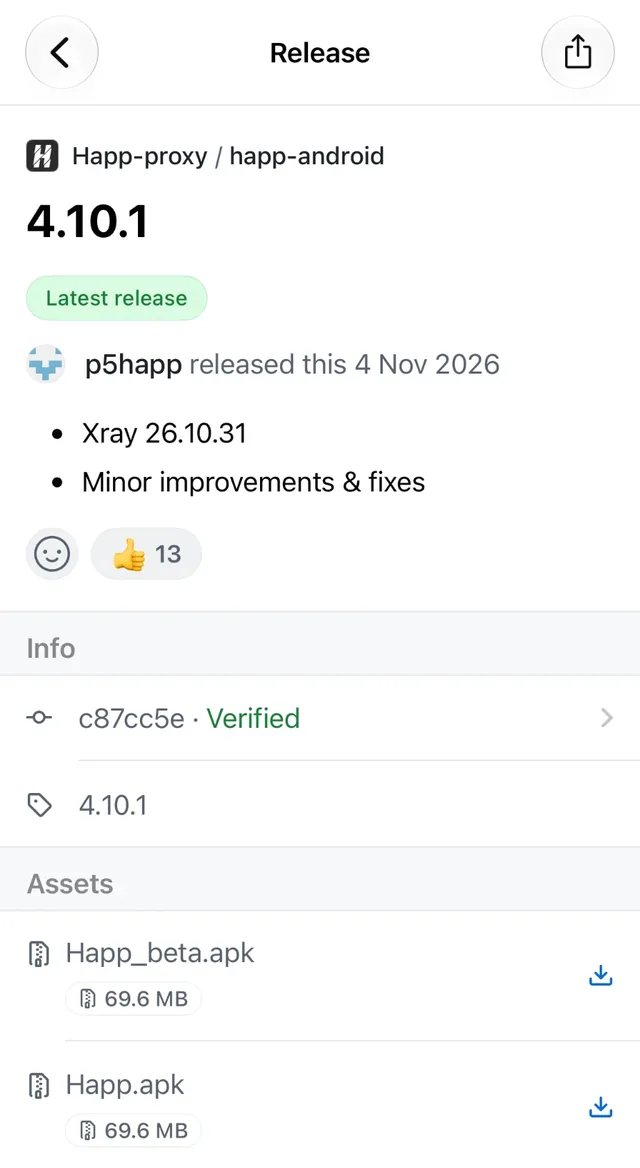
The official releases page. Download Happ.apkfrom the Assets list. -
Download
Happ.apkfrom the Assets list.Happ_beta.apkis the test build; skip it unless you want early features. The file is about 70 MB. -
Allow the install. When you open the file, Android asks for permission to install apps from your browser. Tap Settings, turn on Allow from this source, then go back.
-
Tap Install. If Google Play Protect shows a warning about an unknown app, check that you downloaded the file from the GitHub page above, then choose to install anyway.
-
Turn the permission off again. Back in Settings, switch off “Allow from this source” for your browser. You don’t need it for anything else.
Optional: check the file is genuine
On the GitHub release page, each file has a SHA-256 checksum next to it. If you’re comfortable with a file manager or hash app, compare the checksum of the file you downloaded with the one shown on GitHub. If they match, the file is exactly what the developer published.
Add your VPN subscription again
If you’re switching from the old Google Play version, the GitHub build may install as a separate app, and your profiles won’t carry over. Add your subscription again:
- Copy your subscription link. HorusVPN customers will find it in the email with their key, or in @Horus_VPNBot under My Keys.
- In Happ, tap + and choose Add from clipboard.
- Pick a server and tap Connect. The first time, Android asks you to allow the VPN connection.
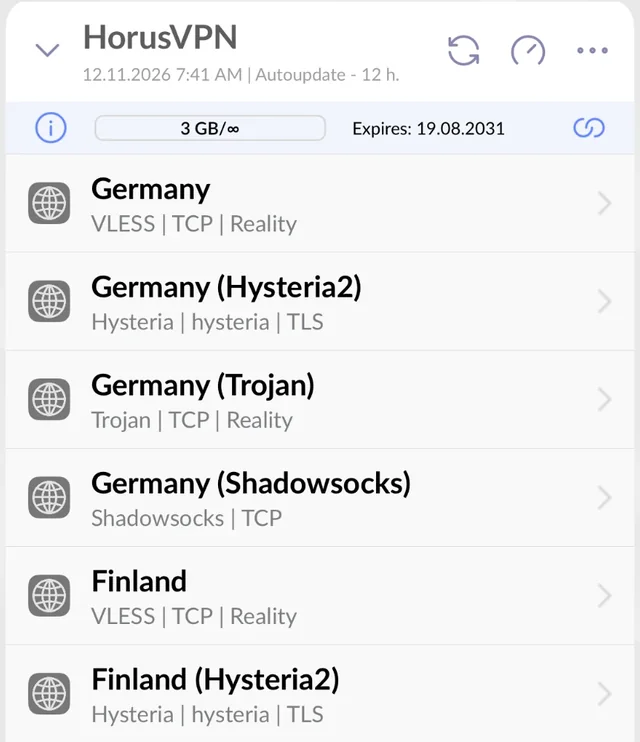
Once the new app works, uninstall the old one so you don’t confuse the two. Our full Happ setup guide covers every platform and the most common connection problems.
How to keep Happ updated without Google Play
Apps installed from an APK don’t update through Google Play. Every few weeks, open the releases page and check whether there’s a newer version than the one in Happ’s settings. Installing the new Happ.apk over the old one keeps your profiles. If you have a GitHub account, you can Watch → Custom → Releases on the repository and get an email for every release.
Questions
Is installing an APK safe?
It’s as safe as the place you download it from. The developer’s official GitHub page is the source the Happ website itself points to. Random APK mirror sites and “Happ” apps on Google Play are not, so avoid them.
Is Happ still free?
Yes. Happ itself is free. You only pay your VPN provider for the subscription you add to it.
Can I use another app instead of Happ?
Other clients support similar protocols, but they work differently with subscriptions and device limits. Some providers, HorusVPN included, require Happ, so check with your provider before switching.
Does this affect Happ on iPhone or Mac?
No. Happ is still available on the App Store for iPhone, iPad and Mac. Windows and Linux builds are linked from happ.su as before.
Need a VPN subscription for Happ? HorusVPN gives you VLESS + REALITY, Hysteria2, Trojan and Shadowsocks in one link for Happ, on up to 5 devices. Try it free for 3 days or see the plans.