
When a VPN won’t connect on hotel or airport Wi-Fi, the cause is almost always one of four things: you haven’t finished the network’s login page, the network blocks the ports or protocol your VPN uses, it recognises VPN traffic and cuts it, or DNS gets in the way. Work through the fixes below in order. Most people are connected again within two minutes.
Quick fix checklist
- Turn the VPN off, open neverssl.com in your browser and complete the Wi-Fi login page.
- Turn the VPN back on.
- Still nothing? Switch your VPN to a TCP-based protocol (in Happ, pick a VLESS or Trojan server instead of Hysteria2).
- Still nothing? Switch to an obfuscated protocol such as VLESS + REALITY.
- Forget the Wi-Fi network, join it again and repeat step 1.
- Last resort: use your phone’s mobile data as a hotspot.
Here is what each step fixes and why.
1. You haven’t passed the Wi-Fi login page
Hotel, airport and café networks usually start with a login or “accept the terms” page, called a captive portal. Until you complete it, the network blocks everything else, including your VPN. Phones normally pop the page up on their own, but an active VPN often stops that from happening, so the VPN just spins.
Fix: turn the VPN off and open http://neverssl.com. It’s a plain-HTTP site built for exactly this: the network can’t intercept HTTPS pages, but it can redirect this one to the login page. Sign in or accept the terms, wait until normal websites load, then turn the VPN back on.
Hotel logins also expire, often after 24 hours or when you change rooms. If your VPN worked yesterday and stopped this morning, repeat this step first.
2. The network blocks VPN ports or UDP
Guest networks are often set up to allow web browsing and little else. Classic VPN protocols run on their own well-known ports: OpenVPN usually on UDP 1194 and WireGuard on UDP 51820. A network that only lets normal web traffic through blocks them, and many guest networks also restrict UDP traffic.
Fix: switch to a protocol that runs over TCP. In most VPN apps this is a setting called “protocol” or “connection type”. With a HorusVPN subscription in Happ, you don’t change settings: just pick a VLESS or Trojan server instead of a Hysteria2 one, because Hysteria2 uses UDP.
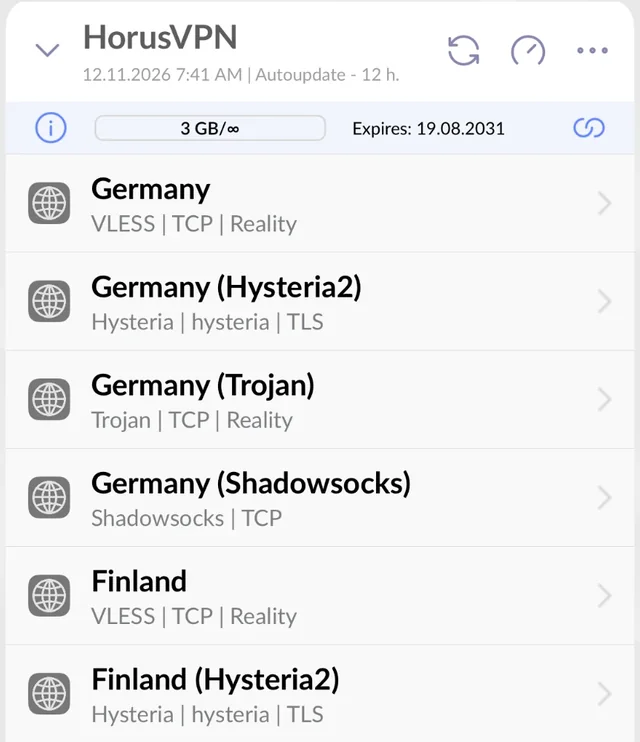
Some very strict networks, often paid airport lounges or conference venues, allow only ports 80 and 443, the ports websites use. For these, HorusVPN runs VLESS + REALITY on port 443 in the UK and the US: pick United Kingdom (443) or United States (443) in Happ, and the connection looks like an ordinary HTTPS site. If nothing works after this step and step 3, jump to the hotspot fix below.
3. The network recognises VPN traffic and cuts it
Some hotels, airports and airlines use firewalls that don’t just block ports: they inspect traffic and drop anything that looks like a VPN. This is deep packet inspection (DPI). The usual symptom is that the VPN connects for a few seconds and then drops, or shows “connected” while nothing loads.
Fix: use an obfuscated protocol, one designed to look like ordinary web traffic. The strongest option today is VLESS + REALITY: to the firewall, the connection looks like a normal encrypted visit to a large, well-known website. Trojan and Shadowsocks are useful backups. We explain how this works in what VLESS + REALITY is and why VPNs get blocked by DPI.
4. On a plane: check what your Wi-Fi plan allows
Inflight Wi-Fi has its own rules. Free “messaging” plans let through only chat apps such as WhatsApp or iMessage and block everything else, VPNs included. Paid plans usually allow VPNs, but satellite links have high latency, so connections take longer to start.
Fix: if you’re on a messaging-only plan, upgrade to a browsing plan or wait until you land. On a full plan, choose a TCP protocol (VLESS or Trojan) and give the VPN 10–20 seconds to connect before switching servers.
5. DNS and network hiccups
Sometimes the Wi-Fi is fine but your device has kept a broken state from an earlier session, such as an old DNS server or an expired login.
Fix:
- Forget the Wi-Fi network in your phone or laptop settings and join it again.
- Toggle airplane mode on and off.
- Restart the VPN app.
- Then repeat step 1, because rejoining often brings the login page back.
Still not working? Use your phone as a hotspot
If the hotel or airport network blocks everything except basic browsing, the quickest way around it is your own mobile data. Turn on your phone’s personal hotspot, connect your laptop to it and start the VPN there. Roaming data within the EU, or a local eSIM, is often cheaper than you’d expect for a few hours of work.
How HorusVPN handles restrictive Wi-Fi
We built HorusVPN for networks that block VPNs. Every location runs four protocols at once: VLESS + REALITY, Hysteria2, Trojan + REALITY and Shadowsocks-2022. In the UK and the US there’s also a VLESS + REALITY server on port 443, for networks that let through nothing but web traffic. Everything arrives in a single subscription in the free Happ app. When one is blocked on the Wi-Fi you’re on, you switch to the next in two taps. There’s nothing to reinstall and no settings to change.
If you travel often and keep running into blocked Wi-Fi, try HorusVPN free for 3 days in our Telegram bot, no card needed, or see the plans.
On Android? Happ is currently missing from Google Play, so read how to install the official Happ APK safely first.
Questions
Is it legal to use a VPN on hotel or airport Wi-Fi?
In the US, the EU, the UK, Australia and New Zealand, using a VPN is legal. A hotel or airport can still set its own network rules, and blocking VPN traffic is one of them. A VPN doesn’t make anything legal that would otherwise be illegal.
Is hotel Wi-Fi safe without a VPN?
Most websites and apps now use HTTPS, so other guests can’t read what you send. But the network operator can still see which sites you visit and when. A VPN hides that, which is why many people use one on any network they don’t control.
Why does my VPN work at the hotel but not at the airport?
Every network has its own firewall rules. One might allow UDP and VPN ports while another allows only web traffic or inspects packets. That’s why it helps to have several protocols ready in one app rather than a single one.
Why does my VPN say “connected” but nothing loads?
Usually the network is dropping the traffic inside the tunnel (step 3), or the Wi-Fi login has expired (step 1). Disconnect, check that normal sites load without the VPN, then reconnect using a different protocol.